Antivirus Defender: Cleaner, malware protection and media maintenance for Android
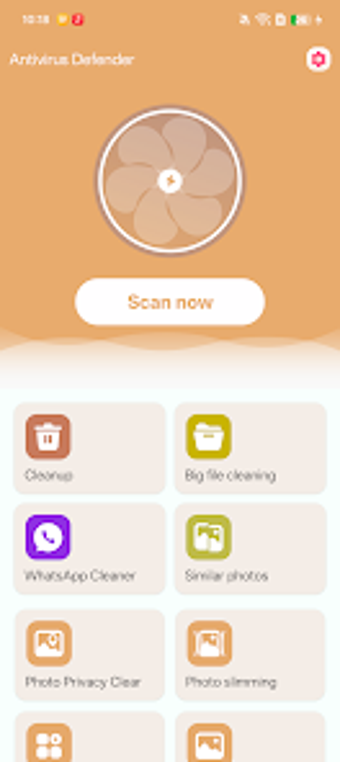
Experience Antivirus Defender: Cleaner by shahidtech, a mobile utility that protects Android devices and manages internal storage. The app combines on-device malware detection with tools for removing junk, large files, and duplicate images, plus image compression and EXIF stripping. Its interface centralizes virus scanning, media management, and app uninstallation into a single workflow. It targets Android users with large media libraries or photo-privacy concerns who want a single place to maintain device hygiene and reduce storage clutter. It is actively maintained.
It merges malware scanning with focused media cleanup in one interface
Antivirus Defender: Cleaner groups a Virus Scanner alongside storage utilities so security checks and file cleanup happen from the same screen. The toolset includes a Junk Cleaner, Large File Cleaner, Duplicate Photos Remover, Photo Compressor, Photo Privacy Cleanup, and an App Manager. Users can run discrete tasks or address media and apps together, which is practical when freeing space after a period of heavy photo and video use.
Scanning requires standard Android permissions and targets removable threats
The virus scanner is designed to detect and remove malicious programs on-device, and the app requests standard file and system permissions to perform deep scans. Because those permissions let the tool access storage, the scanner can examine app and media files directly. The product notes active maintenance and encrypts data in transit, which supports secure signature updates and server communication used by the scanning component.
Photo privacy and optimization tools give concrete control over images
The Photo Privacy Cleanup tool explicitly removes EXIF location metadata from images, and the Photo Compressor reduces image file size to save space. Duplicate Photos Remover identifies identical images for deletion. For users focused on photography privacy and storage, these functions provide tangible steps: strip location data, compress archives of images, and remove duplicates before running broader cleanups.
Everyday users can operate basic tasks, but batch edits need caution
The App Manager shows installed applications and enables uninstallation from the same interface, reducing context switching. Nevertheless, bulk operations that delete or alter files do not list an in-app backup or rollback control among the main tools, so users should plan safeguards. Casual Android users find the centralized workflow convenient, while power users should confirm external backups before large-scale removals.
Practical option for routine device maintenance, with one notable precaution
Antivirus Defender: Cleaner is a practical option for Android users who want combined security checks and storage housekeeping. The main trade-off is the apparent absence of an explicit in-app backup or rollback mechanism before batch file changes. As a precaution, back up important media externally and schedule intensive scans or bulk cleanups during idle hours to avoid interrupted operations and data loss risks.